Skip to content
Reimagining IT Operations: The Role of AI Agents in Modern IT Teams WATCH NOW
ignio™ release - Digitate Unveils Industry's Most Comprehensive AI AgentsREAD MORE
Agentic AI for Autonomous IT – Unveiling Digitate’s AI AgentsWATCH NOW
Enterprise AI & Automation Software Solutions - Digitate
Main Menu
  • Products
      What we solve

      Digitate’s empowers organizations to transform their operations with intelligence, insights, and actions.​

      Platform Overview
      ignio Products

      AIOps

      Redefining IT operations with AI and automation

      • Observe
      • Cloud Visibility and Cost Optimization
      • Business Health Monitoring
      • IT Event Management

      Workload Management

      Enabling predictable, agile and silent batch operations in a closed-loop solution

      • Business SLA Prediction

      ERPOps

      End-to-end automation for incidents and service requests in SAP

      • IDoc Management for SAP

      Digital Workspace

      Autonomously detect, triage and remediate endpoint issues

      Cognitive Procurement

      AI-based analytics to improve Procure-to-Pay effectiveness

      Assurance

      Transform software testing and speed up software release cycles

  • Platform
      What we do

      Digitate helps enterprises improve the resilience and agility of their IT and business operations with our SaaS–based platform.

      Platform Overview
      Platform

      ignio™ Platform

      ignio™, Digitate’s SaaS-based platform for autonomous operations, combines observability and AIOps capabilities to solve operational challenges

      AI Agents

      ignio’s AI agents, with their ability to perceive, reason, act, and learn deliver measurable business value and transform IT operations.​

      • AI Agent for IT Event Management
      • AI Agent for Incident Resolution
      • AI Agent for Cloud Cost Optimization
      • AI Agent for Proactive Problem Management
      • AI Agent for Business SLA Predictions
  • Resources
      Looking for something?

      Discover how we empower customer success and explore our latest eBooks, white papers, blogs, and more.

      Blogs
      Podcasts
      Customers Success
      Omdia Research Report
      Resources

      Analyst Reports

      Discover what top industry analysts have to say about Digitate​

      ROI

      Get insights from the Forrester Total Economic Impact™ study on Digitate ignio

      Webinars & Events

      Explore our upcoming and recorded webinars & events

      Infographics

      Discover the capabilities of ignio™’s AI solutions

      Blogs

      Explore insights on intelligent automation from Digitate experts

      Trust Center

      Digitate policies on security, privacy, and licensing

      e-Books

      Digitate ignio™ eBooks provide insights into intelligent automation

      Podcasts

      Explore our upcoming and recorded podcast

      Case Studies

      Learn how businesses overcame key AI-driven automation issues

      Reference Guides

      Guides cover AIOps and SAP automation examples, use cases, criteria

      White Papers and POV

      A library of in-depth insights and actionable strategies

  • Company

      What we solve

      At Digitate, we’re committed to helping enterprise companies, realize autonomous operations.

      Integration
      Channel Partner
      Technology Partner
      Azure Marketplace
      Resources

      Leadership

      We’re committed to helping enterprise companies realize autonomous operations

      Academy

      Evolve your skills and get certified

      Newsroom

      Explore the latest news and information about Digitate

      Contact Us

      Get in touch or request a demo

      Partners

      Grow your business with our Elevate Partner Program

Request a Demo
Request a Demo
Enterprise AI & Automation Software Solutions - Digitate
BLOG

Data Visualization Challenges: rubber-meets-the-road experiences

By Arpita Shome
  • AI/GenAI
🕒 9 min read
Table of Contents
Recent Blogs

Accelerating IT Transformation with Agentic AI

December 15, 2025

AI Agent for Business SLA Predictions: Safeguarding Business Continuity with Predictive Intelligence

December 1, 2025

AI Agent for Proactive Problem Management: A Shift Toward a Ticketless Future

November 3, 2025

AI Agent for Cloud Cost Optimization: From Blind Spots to Smarter Spend

October 23, 2025

AI Agent for Incident Resolution: Combining Intelligence with Autonomous Actions

October 22, 2025

AI Agent for IT Event Management: From Noise to Actionable Signals

October 15, 2025

“What we’ve got here is failure to communicate” — this dialogue from Cool Hand Luke was listed at number 11 in the 100 years … 100 movie quotes list. This dialogue is often so relatable to a day in the life of a data visualization expert. Data visualization is all about communication. And an unsuccessful data visualization almost always leads to communication failure.

We started our data visualization blog series by sharing our experiences about various real-world problems. In this blog, we discuss the challenges in data visualization. So, let’s start by talking about communication failure!

To begin with, let’s refer to an example of presenting climate change report.

  • Figure 1(a) shows a plain text representation of the insights related to the climate change. This representation is difficult to consume. Let’s try to do better than this.
  • Figure 1(b) attempts to present this data in a tabular format. It has all the content however, it does not provide any assistance to derive interpretations. The communication still fails.
  • Figure 1(c) takes a step ahead and uses a multi-coloured column chart to present this data, and — voila! it gets so much to derive inferences. Here are some of the inferences that become easy to derive.
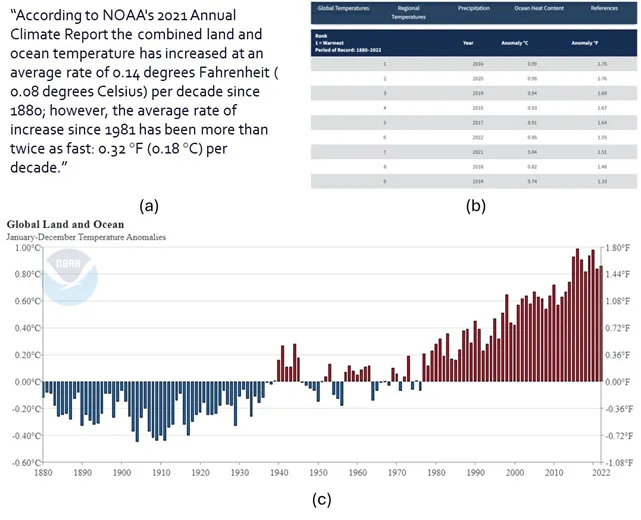
Figure 1: Data representation of climate change analysis.
Figure 1: Data representation of climate change analysis. Source: https://www.ncei.noaa.gov/

This example establishes the power of data visualization. By bringing data to life using insightful plots and charts, data visualization is vital in decision-making processes. Whether it’s the data analysts breaking down their findings to non-technical stakeholders or it’s the data scientists performing A/B tests for marketing purposes, or it’s the machine learning engineers explaining potential bias in complex large language models such as ChatGPT, data visualization is the key to moving from data insights to decision-making.

However, data visualization, if not done right, can easily fail. Many detailed data representations end up in the drawer because they failed to captivate the audience. In this blog, we will explore some of these challenges, understand how and why they manifest, and some real-world tricks to address them.

Data Quality Challenges

Data quality issues can affect the credibility and validity of the visualization and consequently lose the trust and confidence of the audience. Many times, lack of due care in data quality leads to ineffective visualization or, worse, incorrect interpretations.

Visual cues of missing data: Data is considered complete when all the data required for particular use case is present and available to be used. Incomplete data can easily lead to incorrect conclusions. Figure 2 demonstrates this with an example. Figure 2(a) shows a column chart with a metric value over the years. However, a closer look will show that the chart is missing data for many years between 2011 and 2019. Rendering this chart in this fashion hides this fact and thus misleads the user. Visualization should handle missing data with appropriate visual cues to make missing data explicit to the user as shown in Figure 2(b).

Figure 2: Column chart rendering missing data.

Data Selection Challenges

Data selection presents another common challenge in data visualization. It involves deciding what data to include or exclude, what level of detail or aggregation to use, what variables or dimensions to focus on, and what comparisons or relationships to highlight. It also requires a balance between showing enough data to provide evidence and insight, and avoiding too much data that can overwhelm or confuse the audience.

Interactive selections: Figure 4 presents a line-chart that is rendering too much data. Figure 4(a) renders a 10-line chart making it very difficult to interpret. Right use of colours and interactive visualization often comes as handy tools to deal with rendering large data. Figure 4(b) presents a concept of allowing to select/deselect the line charts making it easy for the viewer to interpret data.

Figure 4: Line chart rendering too much data.

Interactive drilldowns: Let’s look at another example wherein too much data leads to poor understanding and inaccurate conclusions. Figure 5 shows an example of Major league soccer salaries for the month of May 2013. Figure 5(a) shows the salary of each player of each team. Each tile is color-coded by player position and the size of each title represents the salary of the player. As we can see, this representation inundates the user with too much information to consume.

Often, an effective solution to present large data is through interactions visualization to represent aggregated data and then enable systematic drill down to more details. Figure 5(b) simplifies the chart by reducing the content. Instead of rendering the salary of each individual player, it groups the salaries based on the player positions such as forward, defender, midfielder, and goalkeeper. Clicking on each element can then further drilldown into the player-level details of that team.
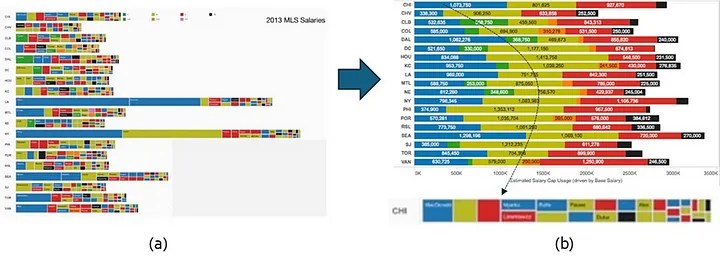
Figure 5: Chart rendering the salaries of Major League Soccer players.
Figure 5: Chart rendering the salaries of Major League Soccer players. Source: https://public.tableau.com/views/MLSSalaries/MLSPUDashboard?%3Aembed=y&%3AshowVizHome=no&%3Adisplay_count=y&%3Adisplay_static_image=y

Figure 6 presents one more example of managing large scale visualization using a systematic drill-down. Batch processes usually consist of a large complex flow of batch jobs. These jobs are interconnected via complex precedence relationships. Rendering this entire process in one single view gets visually overwhelming as shown in Figure 6(a). Instead, Figure 6(b) renders a drill-down view. It first highlights the health of business processes, the ones that need attention, and only deep-dives into the jobs of one specific process. This simplifies the overall visualization experience and significantly improves the usability of the data-driven insights.

Figure 6: Visualization of a complex business process.

Data Representation Challenges

Another fundamental challenge circles around data representation. If the data is of the right quality and has just the right level of detail, selecting the right visual metaphor plays a huge role in conveying the right message from the data. Data representation involves selecting the appropriate type, format, and style of data visualization, such as charts, graphs, maps, tables, icons, or images. It also involves applying the principles and best practices of data visualization design, such as colour, shape, size, layout, alignment, scale, contrast, and hierarchy.

Avoid misleading data representations: Figure 7(a) shows the average CPU utilization of 3 servers. A closer look reveals that the y-axis starts from 75 instead of 0, which leads to incorrect interpretation that the 3 servers observe very different average CPU utilization. Figure 7(b) renders the y-axis from 0 to 100 and presents the true interpretation that the 3 servers have comparable values of average CPU utilization.
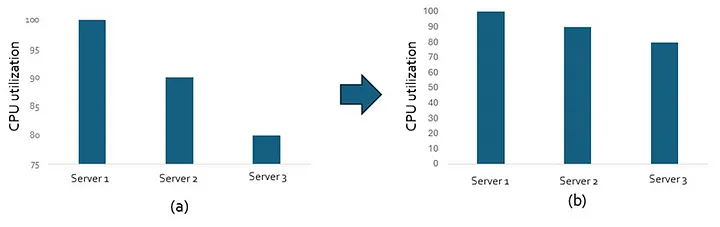
Figure 7: Representation of CPU utilization of 3 servers.

Ensemble approach to selecting chart types: Selecting the right chart type makes a huge difference in the interpretability of data visualization. However, often for a given visualization, one single chart type is not enough. Such situations need an ensemble approach to select different chart type based on the volume or variety of the data. Similar ensemble approaches are now getting adopted in algorithms and databases.
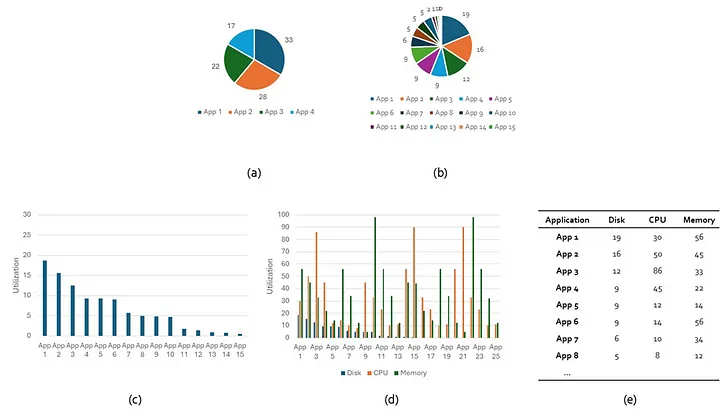
Figure 8: Representation of disk utilization by applications.

Consider the problem of rendering the disk space used by applications.

  • Figure 8(a) shows the disk space used by 4 servers using a pie chart. A pie chart is a perfectly good metaphor when the categories are few.
  • However, the same pie chart becomes practically unreadable in Figure 8(b) when the number of categories increase to 15. In such cases, a column chart presents a better representation as shown in Figure 8(c).
  • However, the column chart becomes difficult to read when there are too many metrics to render for each application. Consider Figure 8(d) which shows disk space used, reads, and writes for each application.
  • Sometimes an interactive visual with tables that allow you to sort, filter, and search from the available data is the easiest and most useful medium of visualization as shown in Figure 8(e).

This ensemble approach to visualize data has been an effective solution in many scenarios. Figure 9 presents one more such example. One of the most challenging visualizations is to render inventory and how it is organized hierarchically into various categories. Some common scenarios include visualization of the inventory of a retail store, or the various software or hardware elements of an enterprise IT estate. Different challenges are presented in this visualization such as too many items, too many categories, an item being part of more than one category, and a deep hierarchy of categories and subcategories. Naturally, a single visualization metaphor is not enough to render such complex data and an ensemble approach offers an effective solution. Thankfully, various suite of tools are available to render inventory data in different forms and different chart suits different needs.

  • A treemap view displays hierarchy using nested rectangles. Figure 9(a) shows an example wherein the treemap has been used to render car sales of different brands. This view is usually effective when the category hierarchy is not too deep.
  • A circle-packed view displays hierarchy in the form of nested circles. Here sublevels are displayed as smaller circles inside larger circles. Figure 9(b) shows an example of circle-packed chart to render fruits and vegetables grouped under various categories and sub-categories. This view enables rendering of a deeper hierarchy than the rectangular tree-map view, but it still cannot scale to very deep category hierarchy.
  • Dendrogram view represents hierarchy in the form of a tree view. This view is ideal to render deeper-complex relationships. Figure 9(c) shows an example of how a dendrogram view is used to render the hierarchy of continents, countries, and cities.
Figure 9: Different metaphors to show hierarchical data.
Figure 9: Different metaphors to show hierarchical data. Source: https://codepen.io/team/amcharts/pen/paXGJj, https://www.amcharts.com/demos-v4/packed-circle-chart-v4/, https://www.data-to-viz.com/graph/dendrogram.html

Similarly, there are many more charts available to render hierarchical data, but no single chart suffices all rendering needs. Hence, ensemble approach presents a practical alternative. Assess the depth and breadth of the hierarchy and select the right chart to best meet the data needs.

Conclusion

Data visualization plays a pivotal role in making data analytics explainable and accessible. However, data visualization presents some unique on-ground challenges which often leads to communication failure. In this blog, we discussed some of these challenges and presented some real-world tricks to address them.

We will continue our journey of exploring the unchartered waters in this space of data visualization in the upcoming blogs. Stay tuned!

Author

Arpita Shome

Technical Architecture | Digitate

Get started with Digitate

Demo

Contact Us

Become a Partner

Contacts

Head Office

3975 Freedom Circle
10th Floor, Suite #1000
Santa Clara, CA 95054

X-twitter Linkedin Youtube Facebook Instagram
Company
  • About Digitate
  • Partner With Us
  • Newsroom
  • Blogs
  • Contact Us
Googke-Play-Store
Support
  • Data Privacy Policy
  • Website Use Terms
  • Cookie Policy Notice
  • Trust Center
  • Services and Support
  • Cookies Settings
  • California Notice At Collection
Apple-Store
Stay Connected
© Tata Consultancy Services Limited, 2025. All rights reserved
Products

What we solve

Digitate’s empowers organizations to transform their operations with intelligence, insights, and actions.​

Platform Overview
Products

ignio AIOps

Redefining IT operations with AI and automation

  • ignio Observe
  • Cloud Visibility and Cost Optimization
  • Business Health Monitoring
  • IT Event Management

ignio AI.Workload Management

Enabling predictable, Agile and Silent batch operations in a closed-loop solution

  • Business SLA Prediction

ignio AI.ERPOps

End-to-end automation for incidents and service requests in SAP

  • IDoc Management for SAP

ignio AI.Digital Workspace

Autonomously detect, triage and remediate endpoint issues

​ignio Cognitive Procurement

AI-based analytics to improve Procure-to-Pay effectiveness

ignio AI.Assurance

Transform software testing and speed up software release cycles

Platform

What we do

Digitate helps enterprises improve the resilience and agility of their IT and business operations with our SaaS–based platform.

Platform Overview
Platform

ignio™ Platform

ignio™, Digitate’s SaaS-based platform for autonomous operations, combines observability and AIOps capabilities to solve operational challenges

AI Agents

ignio’s AI agents, with their ability to perceive, reason, act, and learn deliver measurable business value and transform IT operations.​

  • AI Agent for IT Event Management
  • AI Agent for Incident Resolution
  • AI Agent for Cloud Cost Optimization
  • AI Agent for Proactive Problem Management
  • AI Agent for Business SLA Predictions

Resources

Looking for something?

Discover how we empower customer success and explore our latest eBooks, white papers, blogs, and more.

Blogs
Podcasts
Customers Success
Omdia Research Report
Resources

Analyst Reports

Discover what top industry analysts have to say about Digitate​

ROI

Get insights from the Forrester Total Economic Impact™ study on Digitate ignio

Webinars & Events

Explore our upcoming and recorded webinars & events

Infographics

Discover the capabilities of ignio™’s AI solutions

Blogs

Explore insights on intelligent automation from Digitate experts

Trust Center

Digitate policies on security, privacy, and licensing

e-Books

Digitate ignio™ eBooks provide insights into intelligent automation

Podcasts

Explore our upcoming and recorded podcast

Case Studies

Learn how businesses overcame key AI-driven automation issues

Reference Guides

Guides cover AIOps and SAP automation examples, use cases, criteria

White Papers and POV

A library of in-depth insights and actionable strategies

About Us

Who we are

At Digitate, we’re committed to helping enterprise companies, realize autonomous operations.

Integration
Channel Partner
Technology Partner
Azure Marketplace
Resources

Leadership

We’re committed to helping enterprise companies realize autonomous operations

Newsroom

Explore the latest news and information about Digitate

Partners

Grow your business with our Elevate Partner program

Academy

Evolve your skills and get certified

Contact Us

Get in touch or request a demo

Search
Request a Demo
Contact Us
Products

What we solve

Digitate’s empowers organizations to transform their operations with intelligence, insights, and actions.​

Platform Overview
Products

ignio AIOps

Redefining IT operations with AI and automation

  • ignio Observe
  • Cloud Visibility and Cost Optimization
  • Business Health Monitoring
  • IT Event Management

ignio AI.Workload Management

Enabling predictable, Agile and Silent batch operations in a closed-loop solution

  • Business SLA Prediction

ignio AI.ERPOps

End-to-end automation for incidents and service requests in SAP

  • IDoc Management for SAP

ignio AI.Digital Workspace

Autonomously detect, triage and remediate endpoint issues

​ignio Cognitive Procurement

AI-based analytics to improve Procure-to-Pay effectiveness

ignio AI.Assurance

Transform software testing and speed up software release cycles

Platform

What we do

Digitate helps enterprises improve the resilience and agility of their IT and business operations with our SaaS–based platform.

Platform Overview
Platform

ignio™ Platform

ignio™, Digitate’s SaaS-based platform for autonomous operations, combines observability and AIOps capabilities to solve operational challenges

AI Agents

ignio’s AI agents, with their ability to perceive, reason, act, and learn deliver measurable business value and transform IT operations.​

  • AI Agent for IT Event Management
  • AI Agent for Incident Resolution
  • AI Agent for Cloud Cost Optimization
  • AI Agent for Proactive Problem Management
  • AI Agent for Business SLA Predictions

Resources

Analyst Reports

Discover what the top industry analysts have to say about Digitate

Blogs

Explore Insights on Intelligent Automation from Digitate experts

ROI

Get Insights from the Forrester Total Economic Impact™ study on Digitate ignio

Case Studies

Learn how Digitate ignio helped transform the Walgreens Boots Alliance

Trust Center

Digitate policies on security, privacy, and licensing

e-Books

Digitate ignio™ eBooks Provide Insights into Intelligent Automation

Infographics

Discover the Capabilities of ignio™’s AI Solutions

Reference Guides

Guides cover AIOps and SAP automation examples, use cases, and selection criteria

White Papers and POV

Discover ignio White papers and Point of view library

Webinars & Events

Explore our upcoming and recorded webinars & events

About Us

Who we are

At Digitate, we’re committed to helping enterprise companies, realize autonomous operations.

Integration
Channel Partner
Technology Partner
Azure Marketplace
Resources

Leadership

We’re committed to helping enterprise companies realize autonomous operations

Newsroom

Explore the latest news and information about Digitate

Partners

Grow your business with our Elevate Partner program

Academy

Evolve your skills and get certified

Contact Us

Get in touch or request a demo

Request a Demo
Digitate - Autonomous Enterprise Software
Products

What we solve

Digitate’s empowers organizations to transform their operations with intelligence, insights, and actions.​

Platform Overview
Products

ignio AIOps

Redefining IT operations with AI and automation

  • ignio Observe
  • Cloud Visibility and Cost Optimization
  • Business Health Monitoring
  • IT Event Management

ignio AI.Workload Management

Enabling predictable, Agile and Silent batch operations in a closed-loop solution

  • Business SLA Prediction

ignio AI.ERPOps

End-to-end automation for incidents and service requests in SAP

  • IDoc Management for SAP

ignio AI.Digital Workspace

Autonomously detect, triage and remediate endpoint issues

​ignio Cognitive Procurement

AI-based analytics to improve Procure-to-Pay effectiveness

ignio AI.Assurance

Transform software testing and speed up software release cycles

Platform1

What we do

Digitate helps enterprises improve the resilience and agility of their IT and business operations with our SaaS–based platform.

Platform Overview
Platform

ignio™ Platform

ignio™, Digitate’s SaaS-based platform for autonomous operations, combines observability and AIOps capabilities to solve operational challenges

AI Agents

ignio’s AI agents, with their ability to perceive, reason, act, and learn deliver measurable business value and transform IT operations.​

  • AI Agent for IT Event Management
  • AI Agent for Incident Resolution
  • AI Agent for Cloud Cost Optimization
  • AI Agent for Proactive Problem Management
  • AI Agent for Business SLA Predictions

Resources

Analyst Reports

Discover what the top industry analysts have to say about Digitate

Blogs

Explore Insights on Intelligent Automation from Digitate experts

ROI

Get Insights from the Forrester Total Economic Impact™ study on Digitate ignio

Case Studies

Learn how Digitate ignio helped transform the Walgreens Boots Alliance

Trust Center

Digitate policies on security, privacy, and licensing

e-Books

Digitate ignio™ eBooks Provide Insights into Intelligent Automation

Infographics

Discover the Capabilities of ignio™’s AI Solutions

Reference Guides

Guides cover AIOps and SAP automation examples, use cases, and selection criteria

White Papers and POV

Discover ignio White papers and Point of view library

Webinars & Events

Explore our upcoming and recorded webinars & events

About Us

Who we are

At Digitate, we’re committed to helping enterprise companies, realize autonomous operations.

Integration
Channel Partner
Technology Partner
Azure Marketplace
Resources

Leadership

We’re committed to helping enterprise companies realize autonomous operations

Newsroom

Explore the latest news and information about Digitate

Partners

Grow your business with our Elevate Partner program

Academy

Evolve your skills and get certified

Contact Us

Get in touch or request a demo

Request a Demo