Skip to content
Transforming Retail IT Operations: Taking Back Control with AI-driven ObservabilityREGISTER NOW
Webinar: ACI worldwide showing operational resilience for digital paymentsWATCH NOW
Reimagining IT Operations: The Role of AI Agents in Modern IT Teams WATCH NOW
Enterprise AI & Automation Software Solutions - Digitate
Main Menu
  • Products
      What we solve

      Digitate’s SaaS AIOps empowers organizations to transform their operations with intelligence, insights, and actions.​

      Platform Overview
      ignio Products

      AIOps

      • Observe
      • Cloud Cost Optimization
      • Business Health Monitoring
      • IT Event Management

      Workload Management

      • Business SLA Prediction

      ERPOps

      • IDoc Management for SAP

      Digital Workspace

      Cognitive Procurement

      Assurance

      Platform

      ignio™ Platform

      ignio™, Digitate’s SaaS-based platform for autonomous operations, combines observability and AIOps capabilities to solve operational challenges

      Agents

      AI Agents

      ignio’s AI agents, with their ability to perceive, reason, act, and learn deliver measurable business value and transform IT operations.​

      • AI Agent for IT Event Management
      • AI Agent for Incident Resolution
      • AI Agent for Cloud Cost Optimization
      • AI Agent for Proactive Problem Management
      • AI Agent for Business SLA Predictions
  • Industries
      Industries?

      Explore purpose-built solutions for your industry’s evolving challenges

      View all Industries
      Industries

      BFSI

      AI-powered operations and automation for resilient, efficient banking and financial services.

      Travel & Hospitality

      Enhance travel and hospitality performance with AI, improving service quality and operational resilience

      Retail

      Transform retail operations with AI, automation, and insights for seamless customer experiences

      Consumer Packaged Goods

      Drive smarter CPG value chains with AI-powered automation and real-time consumer insights

      Healthcare & Life Sciences

      Drive resilient life sciences operations with automation, analytics, and regulatory-ready insights

  • Resources
      Looking for something?

      Discover how we empower customer success and explore our latest eBooks, white papers, blogs, and more.

      Blogs
      Podcasts
      Customers Success
      Omdia Research Report
      Resources

      Analyst Reports

      Discover what top industry analysts have to say about Digitate​

      ROI

      Get insights from the Forrester Total Economic Impact™ study on Digitate ignio

      Webinars & Events

      Explore our upcoming and recorded webinars & events

      Infographics

      Discover the capabilities of ignio™’s AI solutions

      Blogs

      Explore insights on intelligent automation from Digitate experts

      Trust Center

      Digitate policies on security, privacy, and licensing

      e-Books

      Digitate ignio™ eBooks provide insights into intelligent automation

      Podcasts

      Explore our upcoming and recorded podcast

      Case Studies

      Learn how businesses overcame key AI-driven automation issues

      Reference Guides

      Guides cover AIOps and SAP automation examples, use cases, criteria

      White Papers and POV

      A library of in-depth insights and actionable strategies

  • Company

      What we solve

      At Digitate, we’re committed to helping enterprise companies, realize autonomous operations.

      Integration
      Channel Partner
      Technology Partner
      Azure Marketplace
      Resources

      Leadership

      We’re committed to helping enterprise companies realize autonomous operations

      Academy

      Evolve your skills and get certified

      Newsroom

      Explore the latest news and information about Digitate

      Contact Us

      Get in touch or request a demo

      Partners

      Grow your business with our Elevate Partner Program

Request a Demo
Request a Demo
Enterprise AI & Automation Software Solutions - Digitate
BLOG

The Science of Data Visualization

By Rohit Karnatak
  • AI/GenAI
🕒 2 min read
Table of Contents
Recent Blogs

The Next Phase of Agentic AI

April 7, 2026

IT as the Proving Ground for AI: Driving Enterprise Innovation

January 29, 2026

CloudOps Revolution: Redefining SaaS Operations

January 20, 2026

Accelerating IT Transformation with Agentic AI

December 15, 2025

AI Agent for Business SLA Predictions: Safeguarding Business Continuity with Predictive Intelligence

December 1, 2025

AI Agent for Proactive Problem Management: A Shift Toward a Ticketless Future

November 3, 2025

In today’s digital age, data isn’t just numbers and figures confined to spreadsheets; it’s a vast landscape of information waiting to be unveiled. Data visualization serves as the gateway to unlock this treasure trove, transforming intricate datasets into captivating visuals that convey stories, trends, and insights. From colorful infographics to interactive dashboards, data visualization has become a powerful tool in deciphering complex information.

In this blog, we discuss how artistry and scientific principles work together to shape effective data visualizations. Designers carefully select colors, shapes, and visual elements to evoke emotions and convey information intuitively. Consider the stunning visualizations by Information is Beautiful, which merge aesthetic elegance with data-driven storytelling, turning raw information into captivating works of art.

At the core of effective data visualization lies scientific rigor. It’s not merely about making data pretty. It involves cognitive psychology, and principles of human-computer interaction to ensure accuracy, clarity, and meaningful representation. An interesting work in this space is by data visualization researchers Fernanda Viégas and Martin Wattenberg, who explore the intersection of art, science, and technology in their work. They focus on creating interactive and engaging visualizations that invite exploration and discovery. A cool example of their work is the project “Wind Map,” which visualizes wind patterns across the United States in real-time, using animated lines and colors to depict wind speed and direction. The mesmerizing visualization captivates viewers while providing valuable insights into weather patterns.

“Wind Map” — to visualize wind patterns across the United States in real-time.
“Wind Map” — to visualize wind patterns across the United States in real-time. Photo Source: http://hint.fm/projects/wind/


From the way our brains process information to the emotional impact of color choices, let’s delve into this science that shapes how we perceive and understand data.

Visual Perception

Researchers have studied how humans perceive and draw inferences from visual design. A very prominent work in this space is Gestalt principles. Gestalt principles are developed on the philosophy of holism — that is — whole is greater than the sum of parts. These principles help designers organize and structure data visualizations in a way that facilitates understanding and enhances the overall user experience. Below, we present a few examples of Gestalt principles.

Proximity: The nearer the objects to each other, the more we logically think that these objects belong to the same group. The following example explains this law using a basic bar chart. Because of the proximity of the bars, we associate the two bars as a group. In addition to that, the proximity of these bars with the labels creates a logical grouping.
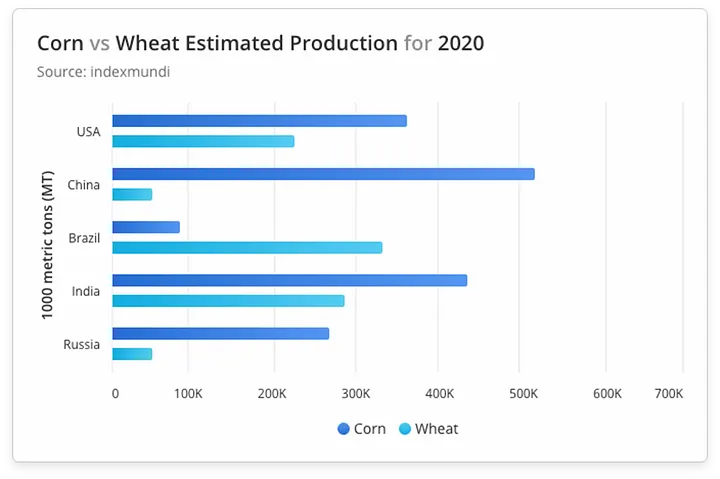
 

Example shows how labels are associated with respective group of bars based on proximity.
Example shows how labels are associated with respective group of bars based on proximity. Source: https://www.highcharts.com/demo/highcharts/column-basic


Similarity: When elements share superficial characteristics such as color, shape, size, etc. we tend to perceive them as related or part of the same group. Consider the following multi-level pie chart of browser market share. Notice how the multi-level pie chart uses color to group related entities and differentiate them from other groupings.


Example shows how similar colors are used to group similar elements of a multi-level pie chart.
Example shows how similar colors are used to group similar elements of a multi-level pie chart. Source: https://www.highcharts.com/demo/highcharts/pie-donut


Closure: Humans prefer complete shapes. Consequently, when presented with incomplete visual information, our brains tend to fill in the missing gaps to perceive complete shapes or patterns. The following figure represents a change in population over the years. The chart has the data missing for the year 1970. However, when we look at this chart, our minds automatically imagine a line connecting the 2 broken lines.


Example shows a line chart with missing data and how humans tend to imagine the missing data to complete the picture.


Continuity: The law states that our eyes instinctively group things aligned with each other. The human eye follows lines, curves, or a sequence of shapes to create pathways. Consider the following example of the bar chart, our eyes follow a continuous path; it makes the whole chart more readable because of the continuous downward direction. If you look closely, we have not used the X-Axis line in this chart. But we see these bars as sharing a common baseline due to the law of continuity.


Example shows a bar chart where our eyes naturally follow a continuous downward direction.


Cognitive Processing

Data visualization can be most effective by understanding the cognitive processing that is involved when humans interact with the data. Three cognitive processes come to play when humans consume data visuals — perception, memory, and attention.

  1. Perception: This is the first step in cognitive processing and refers to how we interpret visual information. Context setting plays a big role in how humans perceive data visuals.
  2. Memory: This refers to how we store and retrieve information present in the data visuals. Memory can be short-term or long-term and helps us interpret the data visuals based on the existing knowledge.
  3. Attention: This refers to how we focus or prioritize on a subset of information in the overall data story.

Setting up a context and a narrative plays a key role in making the best use of these cognitive processes in data visualization.

  • Context refers to the background information about the data that helps establish a frame of reference to understand the data. Context is built by identifying who the story is for and what we want them to do with the story.
  • Narrative, on the other hand, refers to the story that is developed with the data visuals. It helps to create a coherent message from the data visuals.

Let’s take an example of a bar chart that shows data for monthly revenue of a company from different product category.
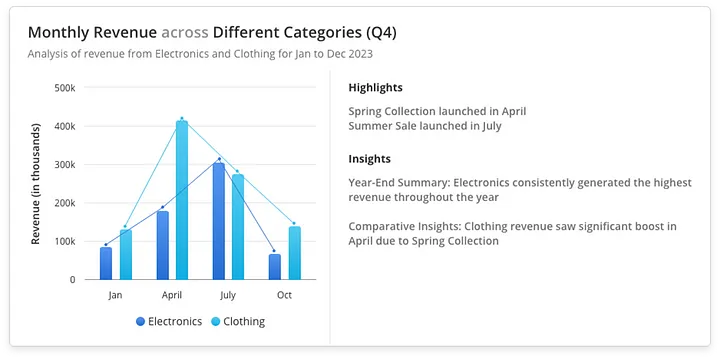
 

Example of monthly revenue report to demonstrate context and narrative.


Now let’s view this chart from Context and Narrative perspective.

Context

  • Who: The audience is clearly identified as the product management and sales team.
  • What: The graph shows monthly revenue by category.
  • Why: The purpose is to help the teams understand the performance of both the product categories, identify trends, and make informed decisions about inventory and marketing strategies.

By providing this context, the graph sets a clear frame of reference for the audience, ensuring they understand the relevance and background of the data.

Narrative

  • Introduction: The graph begins with a broad overview, showing total revenue for each month across both the categories.
  • Middle: Detailed monthly revenue is highlighted, with specific annotations explaining spikes and dips in revenue. For instance, the Spring Collection Launch in April and the Summer Sale in July are directly linked to changes in revenue figures.
  • Conclusion: Key insights and recommendations are provided, summarizing the performance, and suggesting actionable next steps, such as focusing more on marketing efforts during the holiday season to boost revenue.

This narrative guides the viewer through the data, making it easier to follow the story, understand the key points, and take appropriate action based on the insights provided.

Color Theory

Color is a highly subjective aspect. Different color schemes work for different users. However, researchers and practitioners have spent significant efforts to develop an evidence-based science of color theory. Color theory plays a crucial role in guiding the strategic use of color in data visualization, ensuring that visual representations effectively convey insights and patterns to viewers.

Once you have decided the attributes that you want to depict using colors, then a very important aspect is to select the type of color scale that you need for your data. Data usually belongs to 3 types of scales and each scale demands a different set of hues in the color palette:

Sequential Color Scales are used for data that progresses from low to high. These scales are ideal for representing ordered data, where the progression of values matters. Typically, sequential scales use a single hue that varies in intensity or lightness. For example, a calendar heatmap where we can show average temperatures over the country across the month where lighter color represents cooler temperature and darker color indicate warmer temperature.


Calendar heatmap using sequential color scales.
Calendar heatmap using sequential color scales. Source: https://www.highcharts.com/demo/highcharts/calendar-heatmap-month


Divergent Color Scales are used for data that has a meaningful midpoint or critical value, such as zero, around which the data diverges. These scales are useful for showing how data deviates from a central point. It typically uses two contrasting hues that diverge from a neutral midpoint color. For example, in the following graph we show profit and loss with the help of divergent scales that show red for losses, blue for breaking even and green for profits.


Profit-loss chart using divergent color scales.


Qualitative Color Scales are used for categorical data where there is no inherent order. The colors in this scheme should be distinct and easily distinguishable from one another. There is no progression in lightness or intensity, as each category is equally important. For example, the following geo-map uses qualitative scale to represent different countries with different colors.


A geo-map rendered using qualitative color scales.


It is often a good idea to opt for an obvious set of colors that a user can understand without a legend. For example: Red and Green for unhealthy and healthy areas, or Red and Blue for hot and cold areas are some universally understood color maps.

Cognitive Load and Information Overload

Our brains have limits on how much information we can process at a time. It can easily get overwhelmed when presented with large and complex information. This often results in less comprehension and even less retention. Consequently, cognitive load is a critical consideration in data visualization. Cognitive psychology insights offer valuable strategies to manage cognitive load effectively, ensuring that viewers can navigate complex datasets without feeling overwhelmed.

Visual clutter is one of the biggest factors of cognitive load. Gestalt principles that we have discussed earlier such as proximity, similarity, enclosure prove to be very effective to reduce visual clutter and consequently reduce cognitive load.

Pre-attentive attributes offer another promising lever to help humans focus on the information of interest. Our brain is tuned to detect and process a specific set of attributes called the pre-attentive attributes. Pre-attentive processing occurs at a very high speed without our consciousness. We can thus use pre-attentive attributes to draw the audience’s immediate attention and establish a visual hierarchy. Pre-attentive attributes can be broadly classified into four main categories: form, color, spatial position, and movement.

Let’s understand the cognitive load and how we overcome it by examining the below shown Sales Performance Dashboard.


Sales performance dashboard with high cognitive load.


The interface looks cluttered, with inconsistent spacing between elements and chaotic use of colors. It’s hard to tell which visualizations or metrics are the most important, and the graphs are not labeled properly.

Now let’s simplify this dashboard UI.


A decluttered sales performance dashboard with reduced cognitive load.


First by decluttering the interface, we keep the interface simple and remove the unnecessary elements. Then we prioritize the information to display important elements first and creating a grouping of similar elements. Finally, we used clear and concise labels so that the user could easily understand the dashboard.

By doing these modifications to the dashboard, we have strategically organized elements according to this pattern which human eyes follow i.e. Left to Right and Top to Bottom, making a Z pattern to scan the page, with the most important ones placed in the top left corner.


Closing Thoughts

As we traverse the intricate landscape of data visualization, we uncover its symbiotic relationship with the science of cognitive processing. By harnessing the principles of visual perception, cognitive psychology, and emotional engagement, designers unlock the transformative potential of data visualization as a tool for communication, exploration, and advocacy. As we continue to unravel the complexities of the human mind, we unlock new possibilities for data visualization, ensuring that information is not only seen but truly understood and internalized.



Author

Rohit Karnatak

UX/UI Designer

Get started with Digitate

Demo

Contact Us

Become a Partner

Contacts

Head Office

3975 Freedom Circle
10th Floor, Suite #1000
Santa Clara, CA 95054

X-twitter Linkedin Youtube Facebook Instagram
Company
  • About Digitate
  • Partner With Us
  • Newsroom
  • Blogs
  • Contact Us
Googke-Play-Store
Support
  • Data Privacy Policy
  • Website Use Terms
  • Cookie Policy Notice
  • Trust Center
  • Services and Support
  • Cookies Settings
  • California Notice At Collection
Apple-Store
Stay Connected
© Tata Consultancy Services Limited, 2025. All rights reserved
Products

What we solve

Digitate’s empowers organizations to transform their operations with intelligence, insights, and actions.​

Platform Overview
Products

ignio AIOps

Redefining IT operations with AI and automation

  • ignio Observe
  • Cloud Visibility and Cost Optimization
  • Business Health Monitoring
  • IT Event Management

ignio AI.Workload Management

Enabling predictable, Agile and Silent batch operations in a closed-loop solution

  • Business SLA Prediction

ignio AI.ERPOps

End-to-end automation for incidents and service requests in SAP

  • IDoc Management for SAP

ignio AI.Digital Workspace

Autonomously detect, triage and remediate endpoint issues

​ignio Cognitive Procurement

AI-based analytics to improve Procure-to-Pay effectiveness

ignio AI.Assurance

Transform software testing and speed up software release cycles

Platform

What we do

Digitate helps enterprises improve the resilience and agility of their IT and business operations with our SaaS–based platform.

Platform Overview
Platform

ignio™ Platform

ignio™, Digitate’s SaaS-based platform for autonomous operations, combines observability and AIOps capabilities to solve operational challenges

Industries

Autonomous IT Solutions for the Modern Industry

  • BFSI
  • Retail
  • Healthcare & Life Sciences
  • Travel & Hospitality
  • Consumer Packaged Goods

AI Agents

ignio’s AI agents, with their ability to perceive, reason, act, and learn deliver measurable business value and transform IT operations.​

  • AI Agent for IT Event Management
  • AI Agent for Incident Resolution
  • AI Agent for Cloud Cost Optimization
  • AI Agent for Proactive Problem Management
  • AI Agent for Business SLA Predictions

Resources

Looking for something?

Discover how we empower customer success and explore our latest eBooks, white papers, blogs, and more.

Blogs
Podcasts
Customers Success
Omdia Research Report
Resources

Analyst Reports

Discover what top industry analysts have to say about Digitate​

ROI

Get insights from the Forrester Total Economic Impact™ study on Digitate ignio

Webinars & Events

Explore our upcoming and recorded webinars & events

Infographics

Discover the capabilities of ignio™’s AI solutions

Blogs

Explore insights on intelligent automation from Digitate experts

Trust Center

Digitate policies on security, privacy, and licensing

e-Books

Digitate ignio™ eBooks provide insights into intelligent automation

Podcasts

Explore our upcoming and recorded podcast

Case Studies

Learn how businesses overcame key AI-driven automation issues

Reference Guides

Guides cover AIOps and SAP automation examples, use cases, criteria

White Papers and POV

A library of in-depth insights and actionable strategies

About Us

Who we are

At Digitate, we’re committed to helping enterprise companies, realize autonomous operations.

Integration
Channel Partner
Technology Partner
Azure Marketplace
Resources

Leadership

We’re committed to helping enterprise companies realize autonomous operations

Newsroom

Explore the latest news and information about Digitate

Partners

Grow your business with our Elevate Partner program

Academy

Evolve your skills and get certified

Contact Us

Get in touch or request a demo

Search
Request a Demo
Contact Us
Products

What we solve

Digitate’s empowers organizations to transform their operations with intelligence, insights, and actions.​

Platform Overview
Products

ignio AIOps

Redefining IT operations with AI and automation

  • ignio Observe
  • Cloud Visibility and Cost Optimization
  • Business Health Monitoring
  • IT Event Management

ignio AI.Workload Management

Enabling predictable, Agile and Silent batch operations in a closed-loop solution

  • Business SLA Prediction

ignio AI.ERPOps

End-to-end automation for incidents and service requests in SAP

  • IDoc Management for SAP

ignio AI.Digital Workspace

Autonomously detect, triage and remediate endpoint issues

​ignio Cognitive Procurement

AI-based analytics to improve Procure-to-Pay effectiveness

ignio AI.Assurance

Transform software testing and speed up software release cycles

Platform

What we do

Digitate helps enterprises improve the resilience and agility of their IT and business operations with our SaaS–based platform.

Platform Overview
Platform

ignio™ Platform

ignio™, Digitate’s SaaS-based platform for autonomous operations, combines observability and AIOps capabilities to solve operational challenges

Industries

Autonomous IT Solutions for the Modern Industry

  • BFSI
  • Retail
  • Healthcare & Life Sciences
  • Travel & Hospitality
  • Consumer Packaged Goods

AI Agents

ignio’s AI agents, with their ability to perceive, reason, act, and learn deliver measurable business value and transform IT operations.​

  • AI Agent for IT Event Management
  • AI Agent for Incident Resolution
  • AI Agent for Cloud Cost Optimization
  • AI Agent for Proactive Problem Management
  • AI Agent for Business SLA Predictions

Resources

Analyst Reports

Discover what the top industry analysts have to say about Digitate

Blogs

Explore Insights on Intelligent Automation from Digitate experts

ROI

Get Insights from the Forrester Total Economic Impact™ study on Digitate ignio

Case Studies

Learn how Digitate ignio helped transform the Walgreens Boots Alliance

Trust Center

Digitate policies on security, privacy, and licensing

e-Books

Digitate ignio™ eBooks Provide Insights into Intelligent Automation

Infographics

Discover the Capabilities of ignio™’s AI Solutions

Reference Guides

Guides cover AIOps and SAP automation examples, use cases, and selection criteria

White Papers and POV

Discover ignio White papers and Point of view library

Webinars & Events

Explore our upcoming and recorded webinars & events

About Us

Who we are

At Digitate, we’re committed to helping enterprise companies, realize autonomous operations.

Integration
Channel Partner
Technology Partner
Azure Marketplace
Resources

Leadership

We’re committed to helping enterprise companies realize autonomous operations

Newsroom

Explore the latest news and information about Digitate

Partners

Grow your business with our Elevate Partner program

Academy

Evolve your skills and get certified

Contact Us

Get in touch or request a demo

Request a Demo
Digitate - Autonomous Enterprise Software
Products

What we solve

Digitate’s empowers organizations to transform their operations with intelligence, insights, and actions.​

Platform Overview
Products

ignio AIOps

Redefining IT operations with AI and automation

  • ignio Observe
  • Cloud Visibility and Cost Optimization
  • Business Health Monitoring
  • IT Event Management

ignio AI.Workload Management

Enabling predictable, Agile and Silent batch operations in a closed-loop solution

  • Business SLA Prediction

ignio AI.ERPOps

End-to-end automation for incidents and service requests in SAP

  • IDoc Management for SAP

ignio AI.Digital Workspace

Autonomously detect, triage and remediate endpoint issues

​ignio Cognitive Procurement

AI-based analytics to improve Procure-to-Pay effectiveness

ignio AI.Assurance

Transform software testing and speed up software release cycles

Platform1

What we do

Digitate helps enterprises improve the resilience and agility of their IT and business operations with our SaaS–based platform.

Platform Overview
Platform

ignio™ Platform

ignio™, Digitate’s SaaS-based platform for autonomous operations, combines observability and AIOps capabilities to solve operational challenges

Industries

Autonomous IT Solutions for the Modern Industry

  • BFSI
  • Retail
  • Healthcare & Life Sciences
  • Travel & Hospitality
  • Consumer Packaged Goods

AI Agents

ignio’s AI agents, with their ability to perceive, reason, act, and learn deliver measurable business value and transform IT operations.​

  • AI Agent for IT Event Management
  • AI Agent for Incident Resolution
  • AI Agent for Cloud Cost Optimization
  • AI Agent for Proactive Problem Management
  • AI Agent for Business SLA Predictions

Resources

Analyst Reports

Discover what the top industry analysts have to say about Digitate

Blogs

Explore Insights on Intelligent Automation from Digitate experts

ROI

Get Insights from the Forrester Total Economic Impact™ study on Digitate ignio

Case Studies

Learn how Digitate ignio helped transform the Walgreens Boots Alliance

Trust Center

Digitate policies on security, privacy, and licensing

e-Books

Digitate ignio™ eBooks Provide Insights into Intelligent Automation

Infographics

Discover the Capabilities of ignio™’s AI Solutions

Reference Guides

Guides cover AIOps and SAP automation examples, use cases, and selection criteria

White Papers and POV

Discover ignio White papers and Point of view library

Webinars & Events

Explore our upcoming and recorded webinars & events

About Us

Who we are

At Digitate, we’re committed to helping enterprise companies, realize autonomous operations.

Integration
Channel Partner
Technology Partner
Azure Marketplace
Resources

Leadership

We’re committed to helping enterprise companies realize autonomous operations

Newsroom

Explore the latest news and information about Digitate

Partners

Grow your business with our Elevate Partner program

Academy

Evolve your skills and get certified

Contact Us

Get in touch or request a demo

Request a Demo